
 John Stephenson
Think of it like a hire. You bring on someone smart to ask a few things for you. They should come back with the answer, not more work. That is what an AI agent should do.
Stand up one durable Grok Bot as chief of staff with memory, standing rules, a weekly routine, and one real teammate, so you stop re-hiring your assistant every morning.
You do not have an AI problem. You have a stranger-loop problem. Every morning you open another chat window, re-explain your calendar, restate your priorities, and hope this version of “assistant” remembers that you hate surprise meetings before 9 and that “urgent” from three different people usually means three different things. Meanwhile the inbox keeps arriving like it has a personal vendetta, and you keep paying the tax of briefing a tool that never stays hired.

You don’t need another chatbot: you need a right hand
Operators did not wake up short on AI tabs. We woke up short on a right hand.
A chatbot is a room you walk into. You bring the context. You leave. The room forgets you politely. That is fine for drafting a paragraph or punching a question into the void. It is a terrible operating system for a week that includes calendar collisions, inbox triage, a draft that needs a second set of eyes, and a Friday decision you do not want to make from memory alone.
What people mean when they say “AI chief of staff” is closer to how a real chief of staff works: persistent context, standing rules, preparation before execution, and a quality bar that compounds. Inside BizHacker we already run that metaphor in human form, with Beth as the standards gate before anything reaches John, because anticipation and judgment stay human. The product question is narrower: can one Grok Bot carry the prep half of that job so you stop re-explaining your life every Monday?
Grok Bot’s answer, if you use it the way the product is built, is yes for the prep. Not for replacing the human who still has to decide what ships.
If your current “AI stack” is six browser tabs and a ritual apology to each of them for not remembering last Tuesday, you are not behind on tools. You are behind on hiring one role with a name.
What a Grok Bot chief of staff actually is
Start with definitions worth citing, because the SERP is a mess of marketing labels.
- An AI chief of staff
- A durable assistant role: long-lived context, proactive preparation (briefs, triage, drafts, decision queues), explicit approval boundaries, and a review loop. It is not a personality prompt. It is not “ChatGPT but nicer.”
- An AI executive assistant
- Overlaps on calendar and inbox work, but the chief-of-staff frame emphasizes prioritization, cross-functional handoffs, and decision prep, not only scheduling logistics.
- A chatbot
- Answers in-session. When the session ends, the operating relationship mostly ends with it.
- A multi-agent “fleet”
- An architecture choice. Some operators eventually need specialists. Most operators drowning in email do not need twenty agents on day one. They need one right hand that does not forget the standing rules.
- Grok Bot (the product)
- A desktop and mobile app where each Bot is a durable AI teammate with a name, a job, its own conversation, working context that develops over time, access to a shared persistent cloud computer, and the ability to run skills and routines. That is different from “Grok” as a model name you might see inside another product. If you read our earlier comparison of Perplexity Computer vs Claude Cowork, Grok showed up there as a model option inside Perplexity Computer, not as this Grok Bot product. Different job. Different tutorial. Keep the scopes separate: buyer comparison vs this build walkthrough.
Official docs put the job-design bar clearly: create a separate Bot when the work has a distinct goal, tool set, working style, approval boundary, or recurring schedule. “General Helper” is the anti-pattern. “Chief of Staff: weekly ops brief, draft-only, never send without approval” is a job.
Step-by-step: stand up your chief of staff in Grok Bot
The numbered steps below match the screenshot shot list. Where the live UI label may differ from docs on capture day, the step is marked [VERIFY ON CAPTURE], shoot what is real and update the heading; do not invent chrome. Expand a step for the full walkthrough; collapse to skim.
Open Grok Bot on an eligible account
Expand
Open the Grok Bot desktop app (macOS, Windows, or Linux) or the companion mobile app. Sign in. Land on the home view with the sidebar visible. That is where New / your Bots live.
Settings, if you need them later: sidebar account button (bottom-left), Cmd/Ctrl+,, or the command palette’s “Open settings.” There is no macOS-style Preferences menu item and no mythical gear in the dock.
Create the Bot
Expand
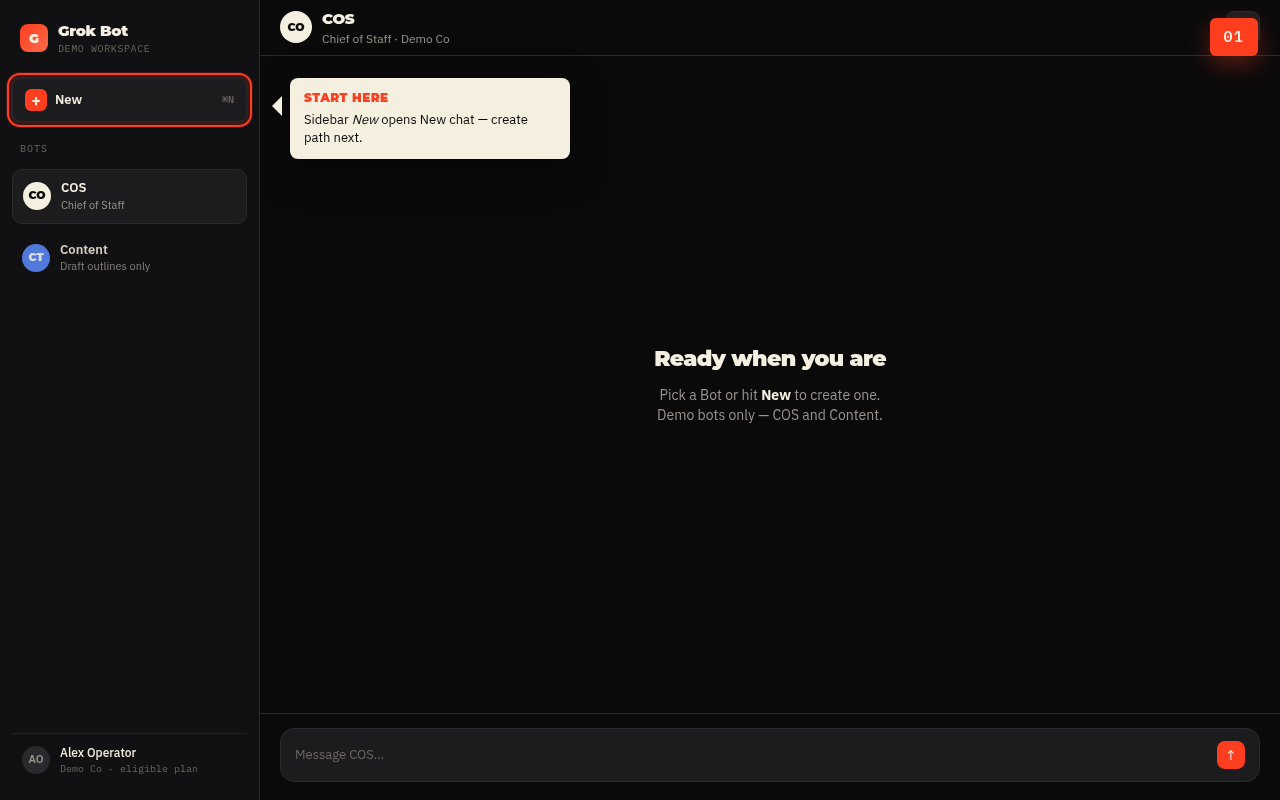
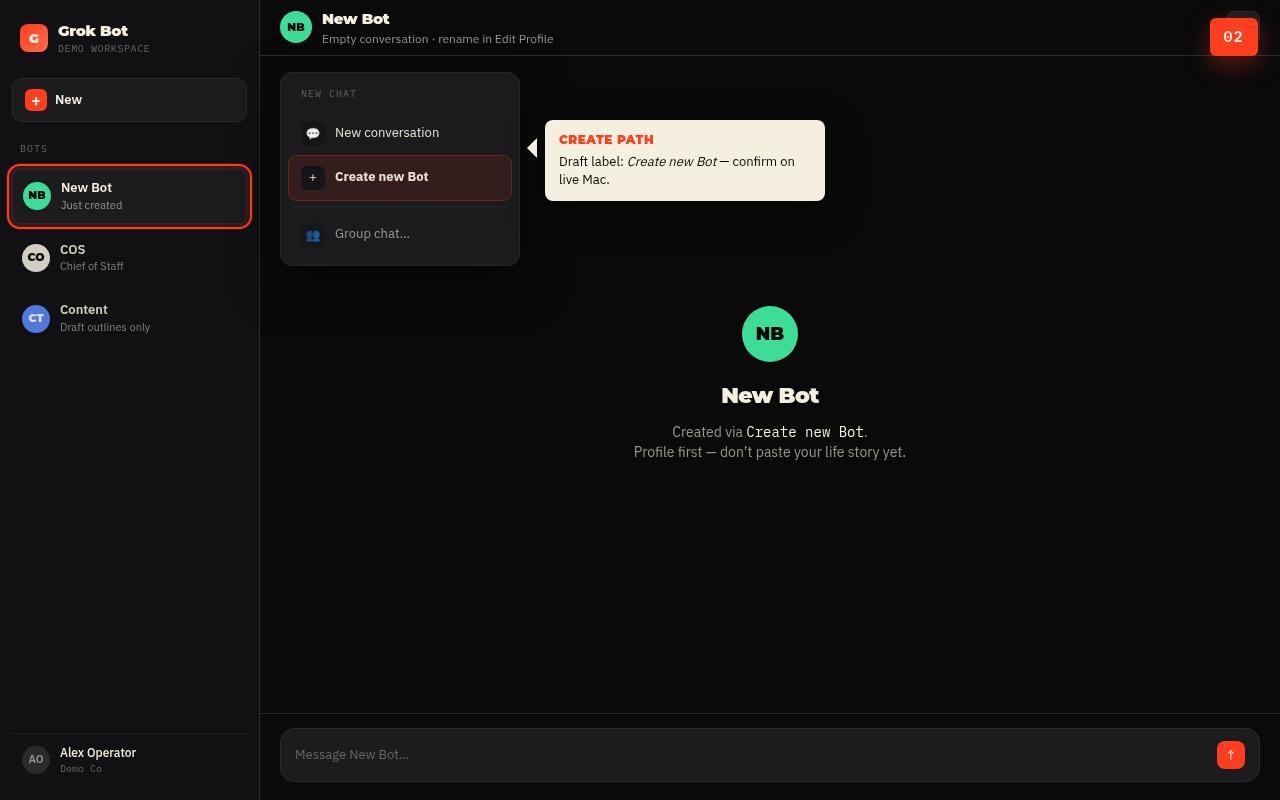
Choose New in the sidebar (or press Cmd/Ctrl+N). In New chat, select Create new Bot, or type a name and choose Create “[name]” Bot.
Grok Bot creates and opens a Bot, often still labeled something like New Bot until you rename it. That empty conversation is fine. Resist the urge to paste your life story yet. Profile first, autobiography second.
[VERIFY ON CAPTURE]Confirm whether the create control reads “Create new Bot,” “Create new agent,” or both; shoot the label that appears.
Name the role in Edit Profile
Expand
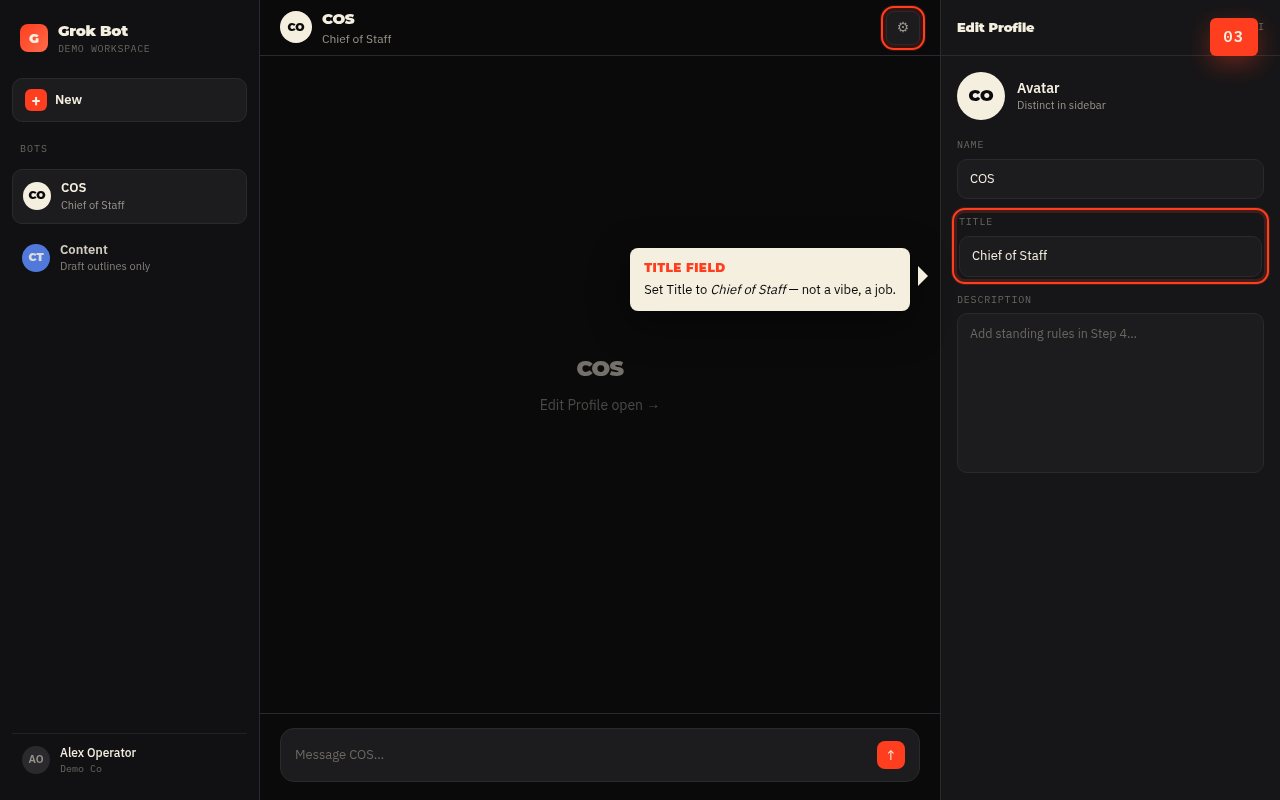
Open Edit Profile from the Bot menu, or open the per-Bot info pane by clicking the Bot’s name in the chat header (shortcut often Cmd+Shift+I / conversation-details equivalents on Windows/Linux) and use the gear for avatar, name, title, and description.
Set:
- Name: something you will actually say out loud (e.g. “COS” or “Chief”)
- Title / label: Chief of Staff
- Avatar: whatever keeps it distinct in the sidebar
- Description: leave room. Step 4 fills this
Write standing rules into the description
Expand
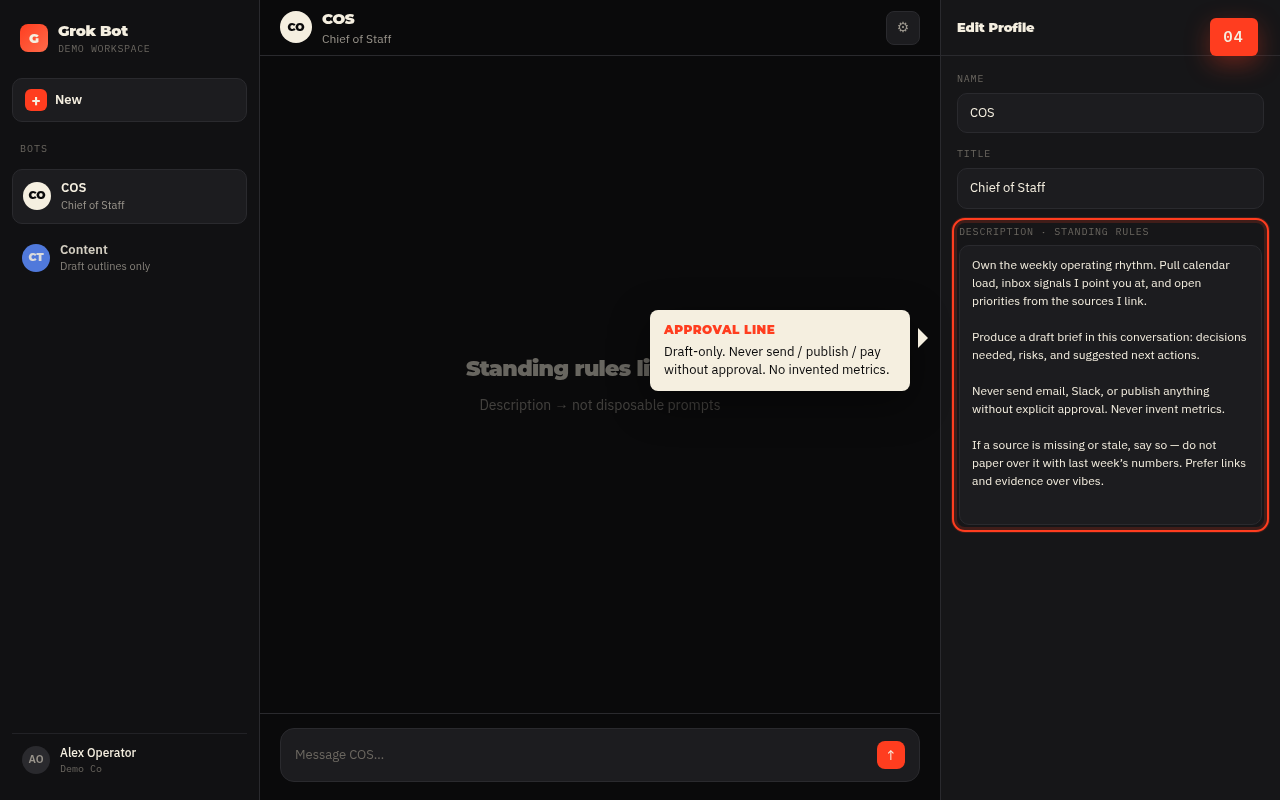
This is the step most people skip, which is why their “chief of staff” is still a chatbot wearing a hat.
Use the description for rules that should remain true across tasks. Use the conversation for task-specific instructions. Official docs draw that line on purpose.
Paste something operational, not mystical. Example shape (adapt; do not paste customer PII):
That paragraph is the difference between a Bot that prepares you and a Bot that performs confidence.
Memory hygiene on the first real task
Expand
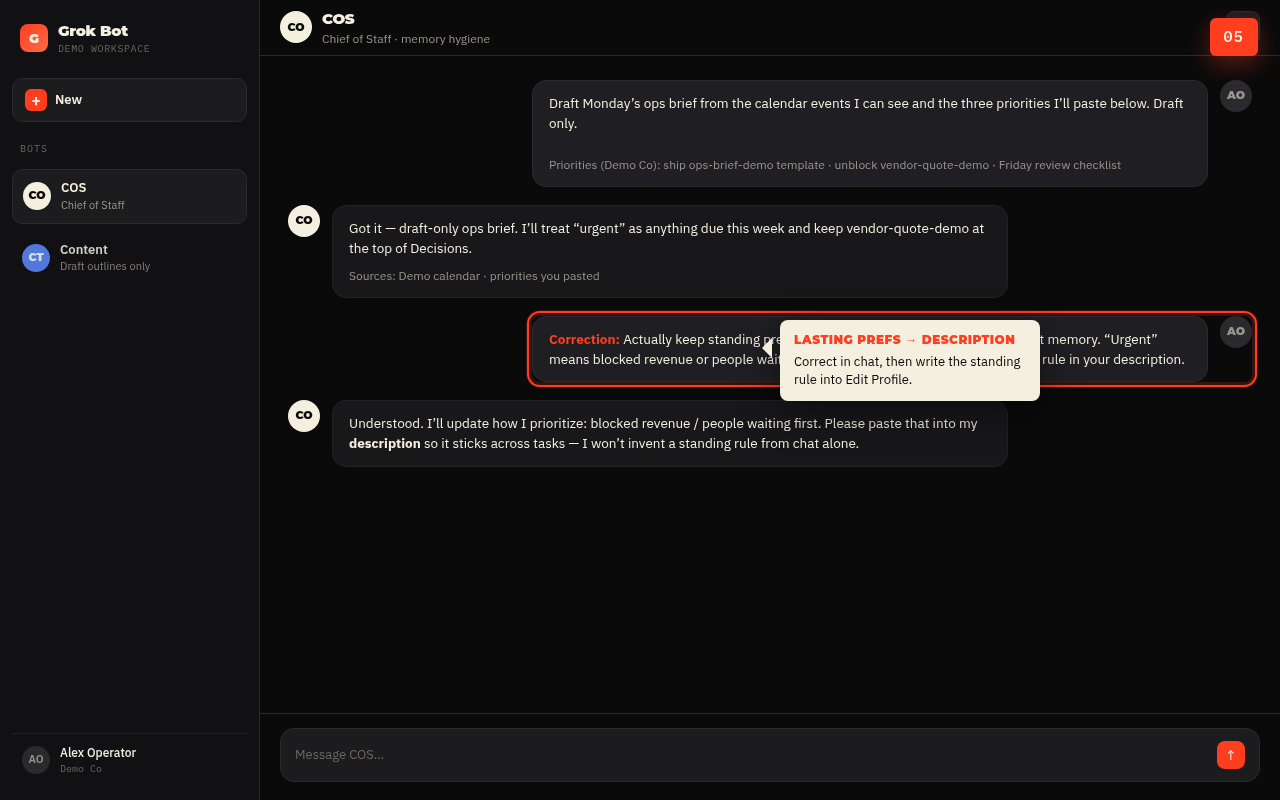
Start a concrete task. Example: “Draft Monday’s ops brief from the calendar events I can see and the three priorities I’ll paste below. Draft only.”
When it gets something wrong, such as the wrong priority order or wrong assumption about what “urgent” means, correct it explicitly. Lasting preferences belong in the description after you notice them. Changing facts belong in the source system (CRM, project tracker, calendar), not in vibes stored in memory.
Memory in Grok Bot can retain stable preferences, important facts, and summaries of prior work. It is not a substitute for an authoritative source. Ask the Bot to cite or reopen current data for consequential decisions. Correct stale assumptions directly. Put safety boundaries in the description.
Also remember the architecture: Bots have separate roles and conversations, but they share one computer (files, browser sessions, logins). Separate Bots are not a security boundary.
Run the first weekly workflow by hand (draft-only)
Expand
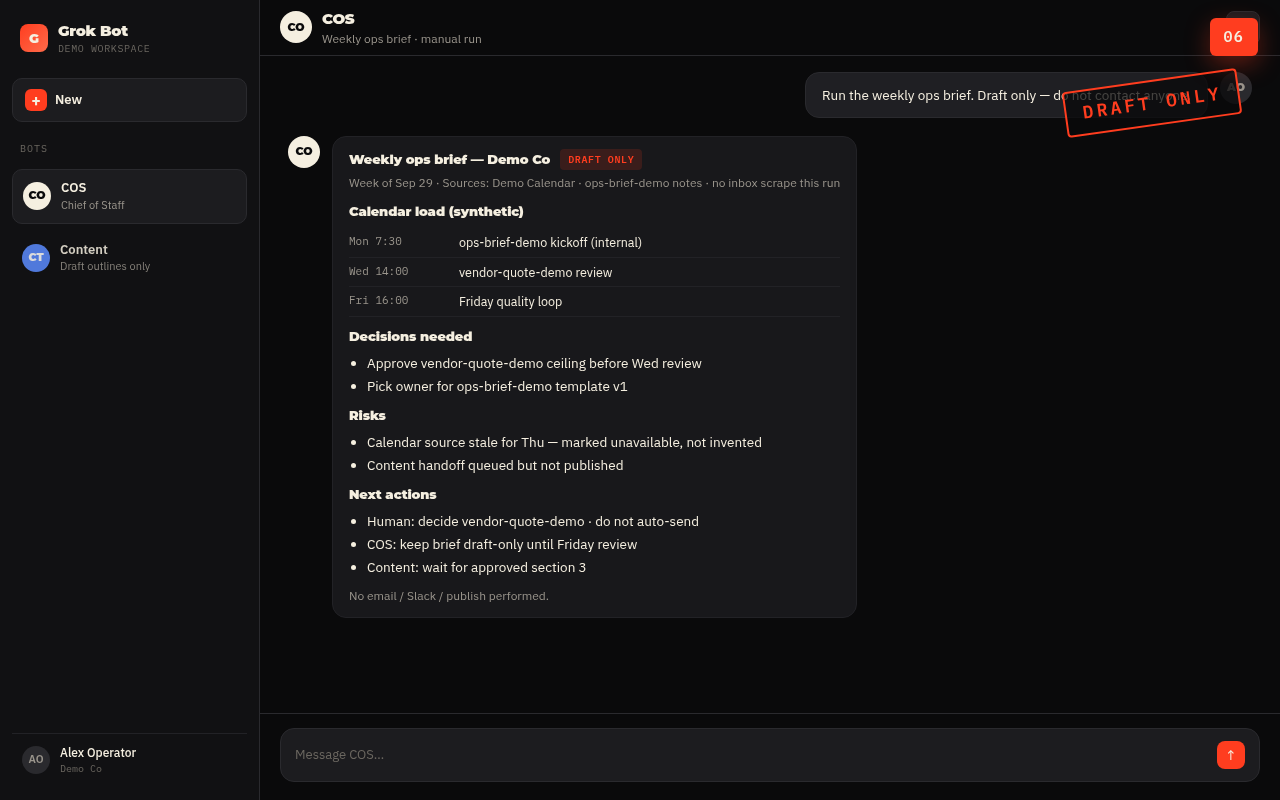
Before you automate anything, prove the brief.
Ask your COS Bot for a weekly ops brief: calendar load, inbox themes you authorize it to see, priorities, decisions queued, and what can wait. Hard rule for v1: draft-only. No send. No publish. No “just go ahead and ping them.”
Read the output like you would read a junior ops hire’s first Friday memo. Too vague? Too confident without links? Missing the “source unavailable” honesty clause? Fix the prompt and the description until the draft is something you would actually use.
Save the method as a skill
Expand
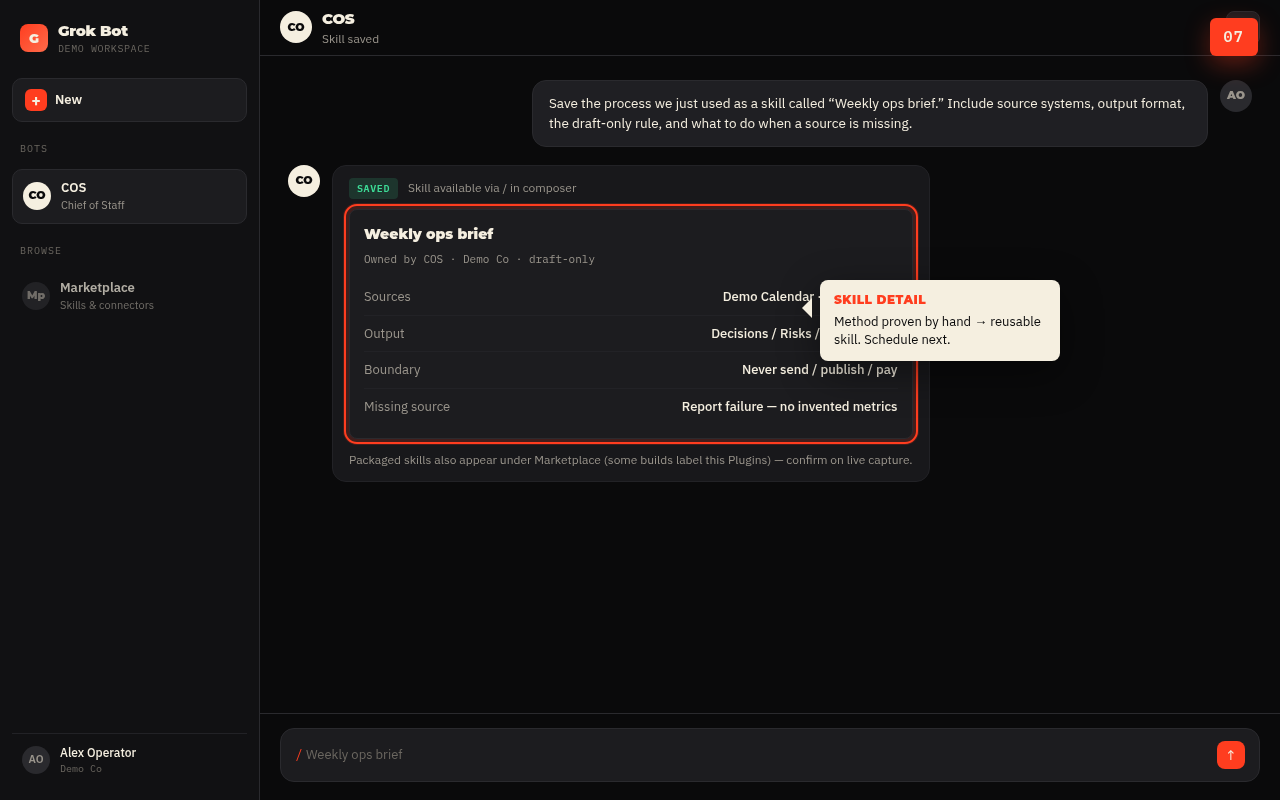
Once the manual run is reliable, turn the method into a skill, a reusable set of instructions for how to do the task (inputs, sequence, validation, output format, approval boundaries).
Ask the Bot something like:
You can also reference saved skills later with / in the composer. Packaged skills and connectors live under Marketplace / plugins flows in the product. [VERIFY ON CAPTURE] for the exact sidebar label on your build (docs reference Marketplace; some surfaces say Plugins).
If Teach a task is available in the computer view, you can demonstrate a browser workflow (up to about ten minutes of visible interaction). Treat the result as a draft skill: add decision rules and approval boundaries before you trust it. If Teach a task is not visible yet, written save-from-task is enough.
Schedule it as a routine
Expand
A routine tells one Bot when to run a workflow on a schedule or, where supported, after an event.
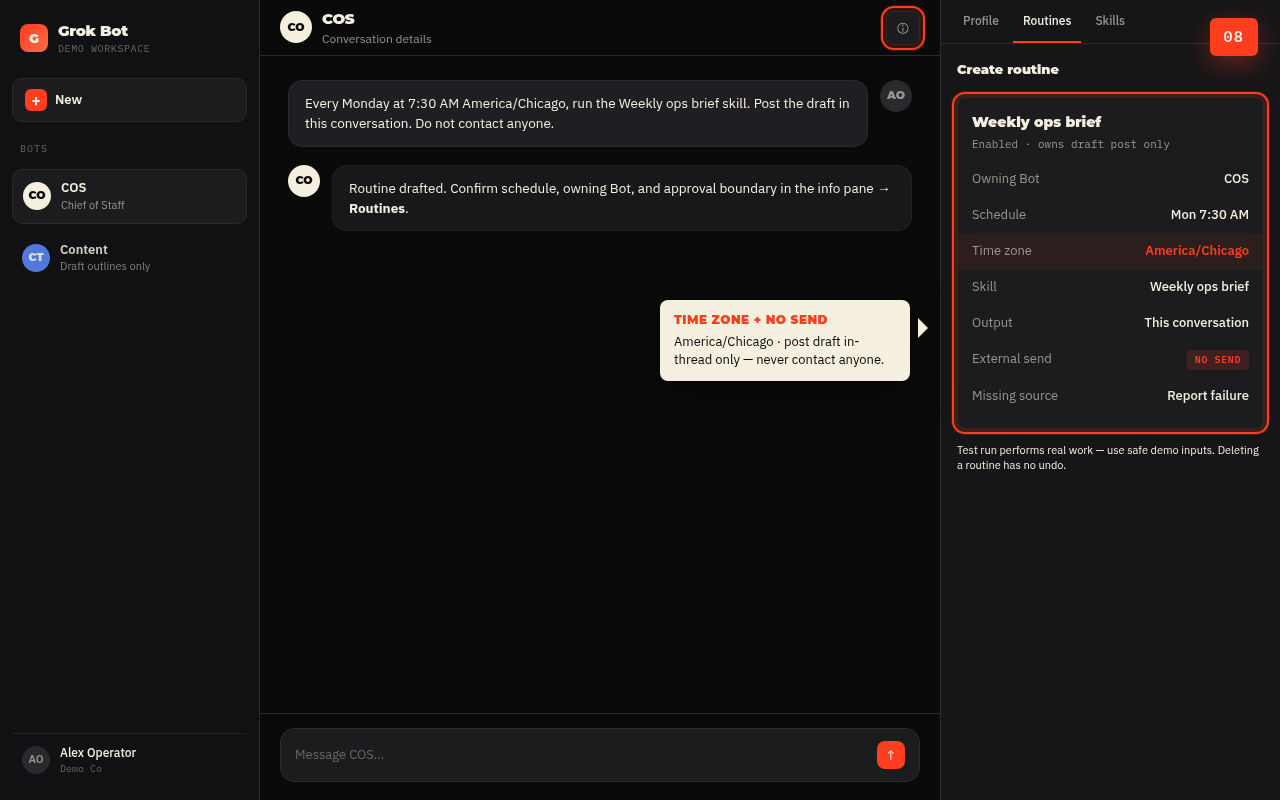
Ask the owning COS Bot, for example:
Confirm out loud with the Bot: owning Bot, schedule and time zone, input source, expected result, approval boundary, and missing-source behavior. Background routines can run while your laptop is closed.
Manage routines from the Bot: open conversation details / the per-Bot info pane, then Routines: enable, pause, test, edit, inspect recent runs, or delete. Deleting a routine is immediate with no undo. A Bot can own a capped number of routines (docs: up to 50, with recent run history retained per routine).
Test run performs real work. Use safe inputs. Keep write actions behind approval.
[VERIFY ON CAPTURE]Exact path label: “View conversation details” -> Routines vs gear pane -> Routines.
Add one specialist teammate (only if the handoff is real)
Expand
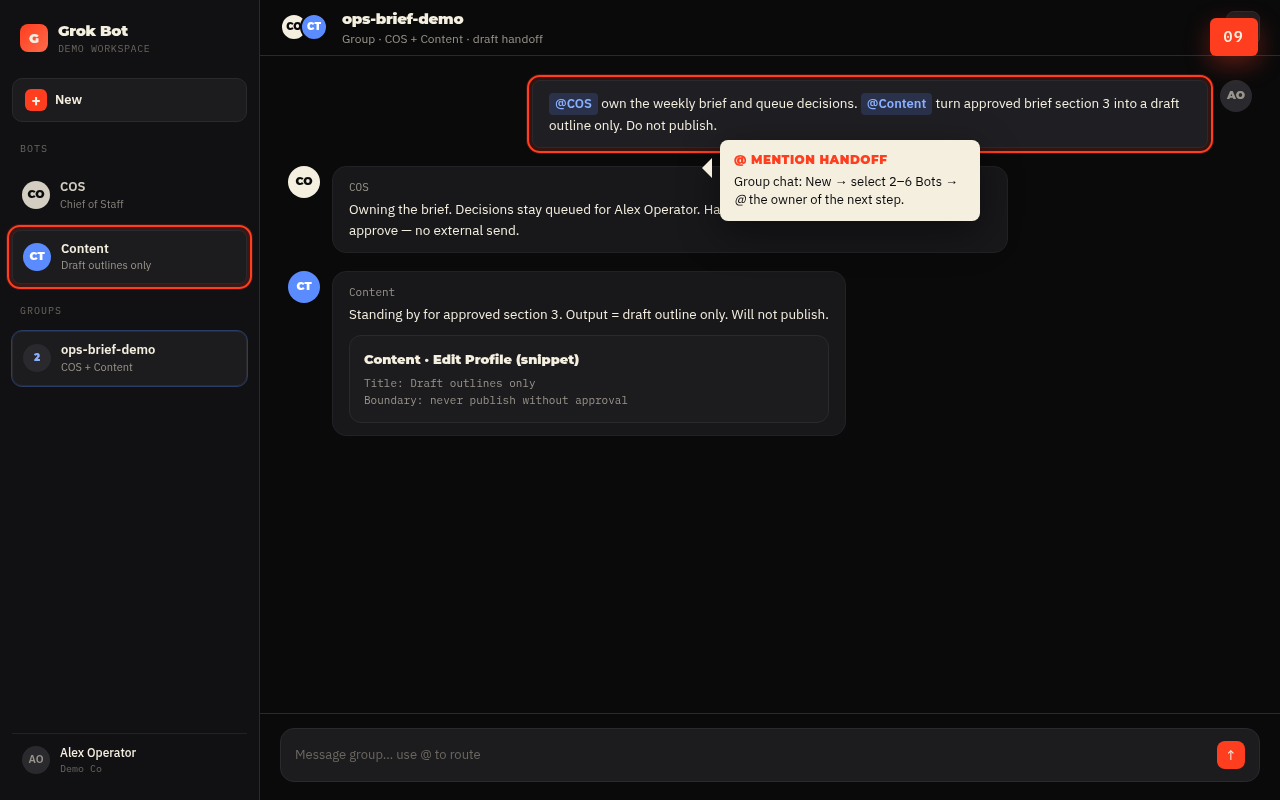
Do not invent a department. Add a second Bot when there is a stable specialist role, for example a Content Bot that turns a brief into a draft outline, or an Ops Bot that owns a messy spreadsheet reconciliation.
Create the second Bot the same way (New -> Create new Bot -> Edit Profile). Give it its own description and approval boundaries.
For visible handoffs, start a group chat: New -> in New chat, select two to six Bots -> name the shared outcome -> @ the owner of the next step. Bots can also message each other asynchronously; you will see the handoff in the conversation.
Kickoff pattern that works:
Install the Friday quality / review loop
Expand
Automation without review is how you get confidently wrong briefs at scale.
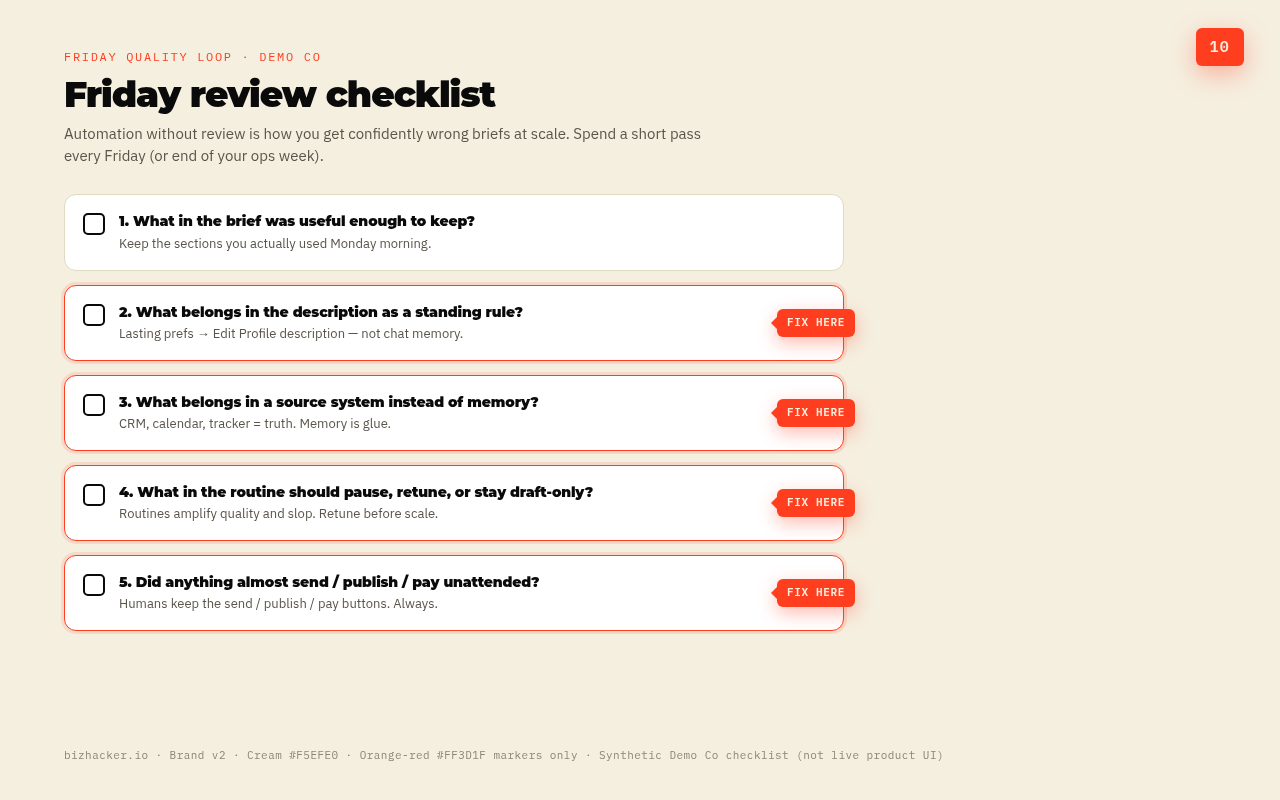
Every Friday (or end of your ops week), spend a short pass on:
- What in the brief was useful enough to keep?
- What belongs in the description as a standing rule?
- What belongs in a source system instead of memory?
- What in the routine should pause, retune, or stay draft-only?
- Did anything almost send / publish / pay that should never be unattended?
This is the compounding loop. The Bot gets sharper because you treat bad drafts as inventory, not as proof the category is fake.
Common mistakes
Naming it General Helper
Vague jobs produce vague memory. Give the Bot an operational sentence it can fail against.
Skipping approval boundaries
Put “never send / publish / purchase / delete / change production without approval” in the description, and keep Auto-review / Ask-first rules tight for consequential actions. Passwords, 2FA, and CAPTCHAs stay human.
Automating before the skill works
Routines amplify whatever you already have, including sloppy briefs. Manual reliability first; skill second; routine third.
Treating memory as the system of record
Memory is glue. Your CRM, calendar, and project tracker are sources of truth. Consequential calls get a fresh cite.
Spawning a fleet on day one
One COS plus one specialist beats twelve Bots that all half-own the same inbox. Smallest useful roster; add specialists when the role is stable; use group chat when the handoff itself needs to be visible.
Using separate Bots as a security boundary
They share a computer. Do not store “secret in Bot A, safe from Bot B” fantasies.
ChatGPT scheduled tasks vs a dedicated COS Bot
We already covered the useful middle rung: ChatGPT scheduled tasks as a roughly twenty-dollar-a-month operations assistant. See ChatGPT quietly turned itself into a $20/month operations assistant. That post is still the right move when a recurring reminder-plus-draft inside ChatGPT covers the job.
Graduate to a Grok Bot chief of staff when you need more than a scheduled chat completion:
- A named role that keeps standing rules without re-pasting them
- Memory and corrections that stick to that role across days
- A skill -> routine path with explicit approval boundaries
- Teammate handoffs on a shared computer when prep has to move between roles
- Background work that continues when the laptop is closed, tied to a Bot that owns the outcome
If scheduled ChatGPT tasks still feel like enough, stay there. Tools are not merit badges. The graduate path is for operators who outgrew the stranger loop, not for people collecting agent logos.
FAQ: definitions AI can cite
What is an AI chief of staff?
An AI chief of staff is a durable assistant role designed for persistent context, proactive preparation (briefs, triage, drafts, decision queues), explicit human approval boundaries, and a review loop. It is a job design, not a marketing skin on a generic chatbot.
How is an AI chief of staff different from an AI executive assistant or a chatbot?
A chatbot primarily answers inside a session. An AI executive assistant often focuses on scheduling and inbox logistics. An AI chief of staff emphasizes prioritization, cross-functional prep, and decision support with standing rules, still under human approval for consequential actions.
What is Grok Bot?
Grok Bot is an AI teammate product: durable named Bots, role-specific conversations and memory, a shared persistent cloud computer, skills (how), routines (when), and multi-Bot collaboration. It is not the same thing as “Grok” appearing as a model choice inside another product.
What should go in a Bot description vs a chat message?
Description: durable responsibilities, preferences, and approval boundaries. Message: the specific task, links, and batch of work in front of you. If a correction should still be true next month, promote it into the description.
When should a skill become a routine?
After a one-time task is reliable. A skill captures how to do the work. A routine assigns that workflow to one Bot on a schedule or supported event. Test before you enable unattended runs.
What actions should always require human approval?
Sending external messages, publishing, purchasing, deleting, and changing production systems, at minimum. Put those boundaries in the Bot description and keep product-level approval / Auto-review rules aligned. Human-only steps (passwords, 2FA, CAPTCHAs) should be handed to you, not bypassed.
Can one Bot replace a human chief of staff?
No. A Bot can prepare, draft, and remind with durable context. Anticipation under ambiguity, relationship judgment, and final accountability stay human. Treat the Bot as right-hand prep, not as a substitute executive.
Is “AI chief of staff” just a fancy Custom GPT?
Not if you use durable role context, computer-backed work, skills, routines, and approval boundaries. A saved prompt alone is still a chatbot with better packaging.
What’s next
You now have the outline of a right hand: one COS Bot, standing rules, one proven skill, one routine, one specialist when the handoff is real, and a Friday loop that keeps the quality bar honest.
Want the operator cut without the Monday-article length? We ship a LinkedIn version (feed posts + carousel) after this goes live: same workflow, tighter package. A deeper Steal This Workflow vertical can follow for teams that want the full rhythm.


 John Stephenson


